Do Heading Tags Actually Matter for SEO? (H1, H2, H3 Explained)
minute read
READ ON
VIDEO: Heading Tags for SEO | How to Use H1, H2, H3 Tags the Right Way
KEY TAKEAWAYS
- Using headings tags only for design purposes leads business owners to misuse them on their website, which can hurt search engine optimization.
- Headings on a website give structure and organization while making content easy to skim and understand.
- The best way to use heading tags are to have one main point per web page and let that be your H1 tag. Then use H2 tags for subheadings and H3 tags for subsections.
Heading Tags Used the Wrong Way Could be Sabotaging Your SEO
Heading tags are one of the most common SEO problems I see on business websites.
Oftentimes misusing H1, H2, and H3 tags stem from business owners using them only as a design tool on their site. However, Google uses these tags to understand your website, so it’s incredibly important to know how to use them the right way so you can rank higher on Google.
What Are Heading Tags?
Heading tags are the titles, subheadings and subsections used on a web page to organize content.
They typically include:
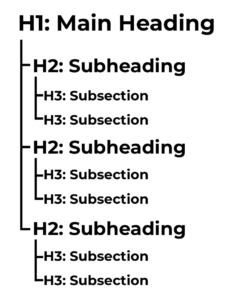
- H1 – the main title of the page
- H2 – major sections on the page
- H3 – sub-points under those sections
Think of heading tags like an outline for your page content. They tell both users and search engines what the page is about and how information is structured.
Remember: These tags are not just for design, they have an important purpose behind the scenes.
Why Google Uses Heading Tags
Google’s job is to understand content as clearly as possible.
Heading tags help Google:
- Identify the main topic of a page
- Understand subtopics and supporting ideas
- See how information is organized
- Determine whether the page matches a searcher’s intent
While headings alone won’t magically boost your rankings, they play an important role in helping search engines understand what content can be found on your website so they can match your site with user searches.
Google has become much more advanced in search results. Keywords alone aren’t going to keep you competitive when it comes to SEO. Competitive SEO includes having a clear topic and purpose on each page of your website.
How Heading Tags Help Site Visitors (Not Just Google)
For years I’ve told my clients to think of Google as a speed reader, it hits the highlights of their website to understand what it’s about. However, nowadays we can expect our site visitors to be scanning our content as well, instead of counting on them reading every word.
For this reason, having a great heading tag structure on your website helps both people and Google.
Clear headings help users:
- Quickly find the information they’re looking for
- Understand what a page covers at a glance
- Decide whether to stay or leave
When visitors can easily navigate your content:
- They stay longer
- They engage more
- They’re more likely to trust your business
These behavior signals matter to search engines. It communicates to search engines that when they recommend a website in search results, users are actually finding the information they are looking for on that website. When this happens, search engines are more likely to recommend your website in future searches for the same type of search.
Common Heading Tag Mistakes I See All the Time
When using heading tags for styling instead of structure, you end up with problems like these:
- Multiple H1s on one page
- Skipping from H1 straight to H4
- Using headings just to make text bigger or bolder
- Applying H1 tags to words like “Welcome,” which does nothing for SEO
This creates confusion for both search engines and users. The main topic and supporting information is not clear at a quick glance.
Headings need to provide structure, not just support the appearance of your site.
Important Tips Business Owners Should Follow
If all someone had to use to understand your website was the headings, would it be clear what you do, who you help, and what problems you solve for clients?
Here are some tips to make sure you can accomplish this on your website:
- Use one clear H1 that describes the page
- Break content into logical H2 sections
- Use H3s only when you need sub-points
- Write headings for people first
Here's a diagram to show how headings should be structured on your web pages:
Why Heading Tags Are Vital for SEO
Search engines are getting better at understanding context and intent, not just keywords.
This means that instead of just having keywords in all of your headings, you need to demonstrate that the subsections in your content support the main topic of the page with relevant information people are actually searching for online.
A great heading tag structure:
- Helps Google understand your page faster
- Helps users find answers more easily
- Supports better engagement and trust
Keep In Mind: Heading tags aren’t going to fix all things SEO-related on your website. However they do get you going in the right direction to make sure Google understands your website so it can match it in the best possible search results.
Let’s Recap: The Right Way To Use Heading Tags
Heading tags should be used to make the content of your web pages clear to people and Google. Think of them like an outline of what information is on your page.
H1, H2, and H3 tags are beneficial because they make your content easy to understand quickly.
Misusing heading tags creates confusion, so we want to avoid common heading tag mistakes in order to rank competitively in relevant search results.
Since headings are just the start to a well-optimized website, be sure to check out my free guide, SEO Simplified. Inside you will get an easy-to-understand guide on what is SEO, why you need it, and my top 5 tips for optimizing your website. (These tips are some of the same strategies I’ve used to get clients in top search results!)
optimize your website for
search engines
Download my SEO Checklist if you:
- Have a website and want search engines to display your site in people's search results
- Are building a website and want to know how to get search engines to discover your new site
- Are a small business owner who wants their website to work for them to bring in potential leads